Friday, March 31, 2017

The Pedagogy of Blended Learning: Change is a Comin'

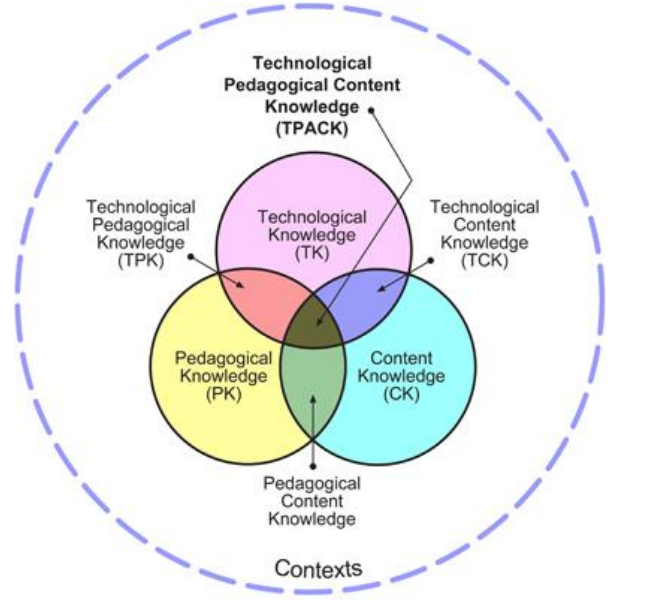
Pedagogy first. Technology second.

You are the expert in your subject matter. Times are changing. Learners are changing. If you're teaching something kids can google, your time and their time is wasted.

We need to be building their skills sets. Preparing them for a world where basic info is in their pockets. What to do with that info however is critical. How to use that info to derive an understanding of the world around them is essential.

The sit-and-take method is a dying model. As is the one-size-fits all method of teaching. Think about one of your classes. You have groups of students that have varying needs. I'm not just talking about those with 504s and IEPs. Reading comprehension issues, learning disabilities, apathy, advanced learners, students with social-emotional needs to name just a few. The list is long and lengthy. The challenges immense. With each set of group needs, there are different strategies that need to be employed. Lesson design needs to accommodate and provide students with the tools to be successful. The learning environment (physical and intellectual) you create needs to be one where all students can learn, develop their skill set, achieve, and be successful.

Thursday, March 23, 2017

#Twitter Roll Call: Just a Roundup of Things to Share

I'm going to start a recurring feature on this blog that looks at certain resources and interesting ideas I find on Twitter. You can always live vicariously through me, or you can sign up for a Twitter account yourself and start building your PLN!! But barring that, here is a bit of random things I've found interesting over the past few weeks.

If you want to get started on Twitter, let me know and I will show you the ropes.

Inspiration:


Interesting Ideas 


Resources & Tools


Argumentation Template: March Madness!!

 We love a good competition. The largest one that takes place around this time of year as the flowers begin to bloom is the NCAA Basketball Tournament. If you don't know what this is, ask a student of yours. Now, not all are fans, this I know, but a number of our students are. I like to incorporate as many student interests in my curriculum as much as I can, regardless of my feelings of them. Side Note: Never try to have your students recreate the story of American Imperialism using the "Twilight" series as inspiration <enter shivering emoji that doesn't exist>

Standards dictate student-writing across the curriculum. And it's not just writing for writing's sake. Different forms of writing need to be taught, practiced, critiqued, honed, and improved upon. Argumentation is one of those forms. Now our students love to argue. But can they argue effectively? Can they communicate their voice effectively in writing?

This activity forces them to take a stance on competing ideas, concepts, individuals, events, or anything else you can think of. The idea is to create a tournament in which students determine the winner by practicing their argumentation and writing skills. I've used this activity in class as a review activity for the Rise of Totalitarianism in the 20s & 30s. The students had to take a stance on certain events and argue which one had greater influence on the rise of dictators and the shift towards isolationism around the globe during the time period. It was well received as students were able to analyze events and movements we'd covered in an in-depth manner. I made it a partnered activity and it was interesting watching pairs argue with each other to place one event over the other.
This is a snapshot of the template I created that you can use and alter as you see fit
If you're interested in creating your own bracket, I've created a document you can make a copy of and alter as you see fit to suit your needs. It's pretty basic so get creative with it. I've included different ideas in the margins of the file for your benefit on how to use the file. If you'd like help with setting up an activity like this, please do not hesitate to ask me. I'd be happy to help.

Download Argumentation Template - March Madness!!

Tuesday, March 14, 2017

District Shift in Blended Learning: The Case for Full Schoology Implementation from a Skeptic

Being out of the classroom this past year has been an interesting venture. I've worked with so many dedicated, thirsty educators looking to improve their craft and in turn their students' experiences. I'm always asked if I miss teaching. I always correct them, quick to say I'm still teaching. My classroom has changed however. And I miss the traditional classroom experience. Immensely. I look at, dissect, play with, and analyse all sorts of different EdTech tools all the time. I send out tips and updates twice a week to you on things I would love to use in the classroom!! Actively Learn? Man I would love to use that!! Digital BreakoutEDU? I would use that all the time! Google Sites? All my students would have their own! But these things flow with my style in the classroom and I feel comfortable using them....which with anything takes time. But this is an era of booming educational technology that I would take advantage of for classroom efficiency, student agency, student engagement, and to help give our students an authentic voice. We all have one bit of technology at our fingertips that is grossly underused in our district that can help in these areas. It's high time we commit to it.

The purpose of this post is to persuade, not to teach. I believe all teachers should have a Schoology presence in their classroom curriculum starting next year. This may be scary for some. Those that know me well, know I was a Schoology resister. I believe it would benefit our student population, our interactions with parents, and help get students "College and Career Ready." Future posts on Schoology will be more geared towards teaching.

Student Engagement
Our students need to be engaged in their learning. This takes on many forms in the context of a given year, unit, or even lesson. There isn't one way to truly engage all learners. The only way we can drive towards near full engagement is through innovative and inspired lesson design. It's you as an expert in your subject and craft developing lessons that challenge and push your students' understanding of the material. Shifting towards a Schoology delivery system will not instantly make your lessons more engaging but it will get you creating and sharing new ideas on how to innovate your curriculum. Once comfortable in a Blended Learning environment, the educator, ever the big picture thinker, starts to see possibilities of innovation. They start to ask "what can I do with this?" That is when students become engaged. When we as educators continually keep things fresh. When we inspire our students to be innovative thinkers through our own.

Interactions with Parents
Study after study shows a growing need for parents to be connected to the classroom to encourage student success. Schoology automates this process as they have access to student performance, they're able to see what goes on a daily basis, and individual or group communication becomes a snap. Because parents "sign in" as a parent to your class their information is there and at the ready for you to easily connect with them. A number of parents have told me they like how easy it is for them to know what is happening in the classroom and that it cuts down on the "How's my kid doing?" emails and phone calls. We have a problem with "system overload" for parents. Teachers have various  avenues of reporting information to parents (websites, eSchools, Schoology, other apps and services, etc ). All are excellent means of communication but for a parent, sometimes even for the tech savviest of them all, this proves both a challenge and a frustration to get a clear picture of how their student is doing. Through uniformity of processes, we can solve this problem if we commit to using Schoology as our chief source of communication with parents through curriculum delivery, parent communication, and timely grade updates.

College and Career Ready
College and Career readiness is not just about content preparation and academic skill development. We've been told for years that we are preparing students for jobs that don't exist yet. I'd say we're doing quite well considering that's like trying to unlock a door in a room full of doors in darkness. However, that's not an apt metaphor. We do know that the world economy is trending towards greater automation and using systems (no matter the career) to manipulate or use data to solve problems. In order to prepare our students we must model this through the delivery of curriculum via a system that allows them to organize and track data, to manage their workflow, and to learn how to solve problems efficiently and collaboratively. This was one of the reasons for the 1:1 initiative - for students to become familiar and proficient in a 21st century environment. I'm not sure the worksheet system is one that prepares our students for future careers. Using an LMS in the classroom will get them familiar with systems they will find themselves learning in as they extend their formal education and when they enter into their chosen careers. The LMS you have at your disposal is Schoology. And it's a pretty good one.

Is Schoology perfect? No way. Teachers have legitimate problems with the system with respect to its integration with 3rd party services (namely eSchools and TurnItIn). Some teachers haven't had enough experience in the environment to understand how it can benefit them and their students - I was certainly that teacher when we purchased the product years ago. I also know that a number of teachers need a lot of tech training in general to feel comfortable to take the leap. I sympathize with those concerns. I also believe that those fears and concerns could dissipate through time with a full commitment to make it work better for teachers, better for students, and better for parents. Take time looking into Schoology this summer (only a few months away) if not sooner and think about what is possible. I'm here to assist those that want to make that shift. I'm hoping everyone will if you haven't already.


Monday, March 6, 2017

Tech PD Deadline Looms!! - April 7th!!

Folks, all year it has been a pleasure to host Professional Development sessions to help you stretch the rubber band as John Eick would say. I daresay I've had the pleasure of seeing most of you over these past number of months. But I have not seen everyone. This I know. Some of you have already met your obligations a while ago. Some of you may be reading this and are worried that this is the first you are hearing about it.

If this is the first you are hearing about this....I'd like to say....Hi! How are ya? My name is Daniel and I'm here to help.


Here are the nuts and bolts:
  • You need to have obtained 6 hours of Tech Professional Development by Friday April 7 (before going on Spring Break)
  • You will need the Hours Log turned into your site administrator
  • You will need to have obtained those hours via an approved source
For those that still need hours to meet these criteria I offer you a few options (you can use a combo of these options btw...doesn't just have to be one or the other):
  1. Attend a PD Session with me between now and the end of the month
  2. Work one of the online options - For more information, contact Bob Lyons
    1. Google Training
    2. Common Sense Media
    3. Public School Works 
    4. Webinars on Digital Citizenship
  3. Attend PD from the County Office of Ed
If you're having trouble getting those hours in, let me know and I will assist as best I can. 


Apps I'm Into: Blended Learning, Guided Reading, & Student Organization

Just a quick rundown of some apps I've been looking at in the past few weeks. I get very Google-centric here because of their vast array of resources and the availability of them, but it's important to remember there are amazing #EdTech resources outside of the Google realm. All three of these resources are designed to be for any curriculum. They are tools every class can use as apart of their repertoire.

TES Teach with Blend Space

This is a favorite of a lot of people in the EdTech world. For Blended Learning purposes (think flipped but not completely), this resource is a big one. You can house a series of steps for your students all in one easy to navigate, and use, hub for a self-contained lesson. Add content (documents, video, images, etc.) from your computer or the web, and provide guidance for students. The resource is shareable and embed-able (as you can see below) and makes complex tasks with numerous steps easy for students to grasp.


A link to the above file if you'd like to see it in a new tab:
https://www.tes.com/lessons/C9C0J3u6cp4OPQ/rise-of-fascism-dbq-prep 


Actively Learn

I'm a huge fan of EdPuzzle for videos (forces students to answer questions about the video before proceeding) and Actively Learn works very similarly but with articles and primary source documents. Have students answer questions as they read as part of their check for understanding. Want them to discuss items while they are reading (What? Thinking...while they are reading?), create the space for them. Want them to take a poll within the document at any place to gauge their opinions or understanding? Well....lets' do that!! It's one of those products that asks you to create a classroom and have students sign into it. But it is well worth it. Ken Buck at NU has been giving it a go as of late and he reports its an excellent resource for Primary Source documents and his students' understanding of them. There are a ton of features and options and Actively Learn walks you through the process in an easy to understand way.

With Actively Learn, you set the pace with students, get them to answer all the questions in a rich manner, and allow for a deeper understanding of course material. After clicking, "Read More" check out the pic and gifs on how this looks for the student.

Tuesday, February 28, 2017

Resources for Subjects: Tech Resources to Check out

I know this post won't cover every subject, but I'm hoping that it will have a little something for everyone. You may even find some use in some resources geared towards other subjects. Let me know if there is something specific that you need in your classroom. I'd love to work with you and help in any way I can.

Across Curriculum
  • Peer Grade - Peer feedback on assignments has never been easier. Collect work and redistribute to students for peer review. Complete with backend data for the teacher to analyze peer feedback
  • mysimpleslideshow - Create a script for a story and let the resource find images automatically that flow with your script. Narrate the story or have a computer-generated voice do it for you
  • ELink - Curate any type of resource into a slick looking website or embed-able resource for students. Students could also use it to collect resources on a given topic 
ELA
  • CommonLit - Library of informational texts with questions to gauge understanding and media to facilitate deeper learning
SAT/ACT Prep
  • PrepFactory: Helps students identify what types of questions will be asked on the SAT & ACT using interactive and engaging activities and games
Social Science
  • Hexagonal Thinking Approach - The idea with this tool/activity is to get students to categorize events and concepts related to an overall subject (Think "Causes of WWII" as the subject and political events like the "Munich Agreement" could be an event), you can push your students to identify links between events, and also establish priority over other events. An excellent explanation of this process can be found here. Creating Visual Hexagons is a visual twist on this concept as well that can be done in Google Drawing or Slides

Maths
  • g(Math) add on - easily create graphs, equations and other needs for the Maths class with this add on for Docs & Sheets. g(Math) also has a Google Forms add-on for your formative assessment needs! See the gif below to get yours

Science/STEM
  • The Concord Consortium - a collection of classroom activities and simulations that can be filtered by grade level and subject
Physical Education
Performing Arts
  • Soundtrap - Originally created for music industry artists, this web-based music producing service is user-friendly and allows students in many different performing arts get to use their voice to produce their works
Visual Arts

  • Google Arts & Culture - a repository of artistic work from around the world spanning thousands of years of history 


Writing Assessment Idea: The Single-Standard Rubric

Assessing writing is always a challenge for any teacher. The age-old hurdle of time keeps teachers from creating an assignment that needs to be assessed and feedback provided in a timely fashion. Problem is we can't let time bar us from developing those literacy skills with our students. Rubrics also pose significant challenges as there is a debate about whether they encourage our student's best work or formulaic writing. Wherever you fall on that debate, providing guidance for student writing is extremely important. There are some writing assignments that work without guidance. But with formal writing, students need a guide of sorts. You'd be crazy not to give that guidance....like dress up as a clown for fun crazy!! ***My apologies to all clowns who may be reading this. Please don't hurt me

With that in mind, below is a simple template you can use and alter in anyway you choose. The Single Standard Rubric is open enough to push the high and low achievers. It provides guidance without the cookie-cutter feel of a traditional rubric. It gives you the flexibility to assess and provide feedback in case the writing doesn't fit neatly in a box. The rubric was one I adapted from English Teacher Aric Foster in Michigan. Please feel free to adapt this one to suit your needs.


Snag your copy here if you'd like one

This rubric can be added to or subtracted from based on your needs and based on the assignment. Again, the idea isn't about using this rubric for each writing assignment. Rather, it is a call for holding all students to the same standards, not allowing them to decide which numbers they want to strive for, giving the educator flexibility in assessing their work, while also providing students a chance for students to find their voice.

You could also digitize it. Why not provide feedback from one single Google Form that you can type directly into? The data is housed on a spreadsheet and you can share that sheet with your students. Or set up a mail merge to send a student an individual report on their feedback. Below is an example of this. If you'd like to snag a copy of it, it is found here.


Wednesday, February 22, 2017

Presentation Activity: Ignite Talks with Students

Ever see an Ignite Talk or Pecha Kucha? Ever heard of one? The concept is straight forward. 20 slides playing on the screen switching every 20 seconds. In the end, you have a presentation on any topic done in just under 7 minutes. The slides are minimal - images, gifs, light text if any, no videos - and accompany the story the speaker is telling. There is a ton of practice needed obviously but what emerges is a crisp, concise presentation on the topic of choice.

This would be excellent practice for our students at any level in any subject. For years, teachers have had a difficult time incorporating speeches (whether formal or informal) into their curriculum for obvious reasons: they take a lot of time, require a lot of guidance and monitoring, student fears of getting in front of their peers detracts from effort, teachers, although public speakers on a daily basis, aren't trained to coach the skills, and with content standards to meet they are difficult to justify. Well...standards have changed to include Speaking and Listening skills to get them College & Career ready. And it shouldn't be just ELAs job to meet the standards.

This activity could be used as an assessment, a mid-unit check in, or as an introductory activity related to a theme of the unit. I loved doing formal and informal presentations in class as it gave students an opportunity to learn from each other and work out those fears of speaking in front of others. I'd give students time in class to build their speeches and practice with one another and myself. I'd have them film themselves so they can see what others see in order to analyze their practice performances. In the end, students realized the speech was an important venture because they know they need practice in the skill. They wanted to do their best...right down to the shyest person in the room.

Now, I wish I could tell you each speech incurred a standing ovation. But what I can tell you is that students learned what made a winning speech, what constituted as good techniques for them to borrow from others, and most reported after initial jitters their nerves faded as they had to focus on the speech itself. The process is lengthy but worthy if we're committed to preparing our students for a world that values presentation skills.

~~~~
To run this process in your class, follow these steps:

  1. Introduce the topic (can be anything related to your curriculum or on a topic of their choice) and the assignment - 20 Slides/20 seconds (of course you can adjust the slides and time based on your needs)
  2. Give students time to brainstorm and build the framework of their speech - lots of hands-on help here
  3. Introduce the Rubric (see below)
  4. Show them videos of other Ignite Talks to give them an idea of what they look like - YouTube is full of them
  5. Get your students to write their speeches in class so you can ensure they are writing something of substance
  6. Introduce the Visual Component - Let them know that they need to create "X" amount of slides for their speech
  7. Have students practice their speeches with peers complete with video so they can see and analyze their performance 
  8. Commence with the speeches

The Rubric
I've found Google Forms works best for this as I can sit in the back and assess the student as they're giving their speech without missing much if at all. I fill out the Form and after submitting I click the link that allows me to submit another entry on the Form. I then create a spreadsheet with all the data and share that with the class for immediate feedback. Below is a generic Form I created for this purpose. You can get a copy below it.


If you want this Speech Rubric, click that link and make your own Copy as anyone with this file can edit it. Once yours, you can alter the Form ti suit your needs. If you need help with this, let me know.

Peer to Peer Feedback
I've also found for any speech, it's important to include the audience in a certain task. This keeps students focused on a part of the speech. The discussion that takes place after is actually more helpful for the audience than the speaker themselves. The most effective way that works for me is to break the class into 4 groups (number them off 1-4). The picture below are the four tasks the class completes collectively for every speech.


So the same group doesn't continue doing the same thing, after each speech, I rotate the roles to the next group. So if Group 1 was "A" for the first speech, they will be group "B" for the next.

After each speech I select a student or two, in each group, to report out what they observed (the speaker standing in the front of the room simultaneously relieved and feeling awkward standing in front listening to their peers talk about them). I then give some brief verbal feedback of my own and ask the class to give the speaker an enthusiastic round of applause - despite how they did up there.

~~~
We need to make time for learning experiences like these in the classroom. Not just because there are standards now. They need the chance to practice these essential skills, get feedback from peers and professionals, in a safe environment. Public speaking is a necessary skill in many aspects of life. Our kids deserve these opportunities.

Google Drive Cheat Sheet: Learn How to Survive in Drive

The great Ben Cogswell of Salinas shared this on Twitter not too long ago and I thought some here could use the resource.

Click the link below to access the file and share the link address whith anyone you think could use the help!


He also has cheat sheets on Google Docs & Slides. Give him a follow on Twitter when you get a chance. And if you're not on Twitter yet, here's an InfoGraphic that gives you reasons why you should be. A Visual reinforcement on my posts about Twitter and building or joining a #PLN