Showing posts with label Critical Thinking. Show all posts

Monday, May 15, 2017

Activity Template: The 8-Event Collaborative Timeline Challenge

Google Drawings is one of the G Suite Apps that does not get as much love as some of the other ones. Docs is used pretty frequently for writing and taking notes. Teachers use Slides for lessons and students use it for assessment and creativity. Sheets gets all your data and your list-making (we love a good list, don't we?) But Drawings is an underutilized program that needs its day in the sun! There are so many uses for it in the classroom as you can create images that can be quite interactive.

One of those uses is to create interactive timelines. Wait! Before you leave thinking this is just a post for Social Studies teachers, it is most certainly not. Any subject can incorporate the use of timelines into their curriculum. Whether it is researching an author and how it has shaped their writing in an ELA course, identifying the key events and movements in the development of nuclear technology in a Physics class, or studying the cultural history of a nation in a World Languages class, timelines are extremely useful for a student's understanding of curriculum. Let's dispel the myth that timelines are only for the History class.

As a Social Studies teacher, timelines were essential but I hated just making kids slap a bunch of events together on a line of time and calling it good. I think it is all well and good for them to understand sequence but what was lacking was their understanding of cause and effect or key importance of one event or events over others. We need to push our students to go deeper and think critically on what makes evebts so important within a given subject. We need to force them to evaluate information, make choices, and justify those choices using evidence. This is where this activity comes into play.

The 8-Event Collaborative Timeline Challenge

This is a template and an activity idea for those interested. Of course you can alter it as you see fit (don't like the number 8? Go with whatever number moves you). The idea for this activity is straight forward: get students to make informed choices and justify those choices. In the process they are hitting on the 4 Cs of 21st century learning - Collaboration, Creativity, Critical-Thinking, & Communication.

The detailed rationale and instructions for this activity are embedded on the file (click the pic below to access it and save a copy for yourself) so here is a brief snapshot of how it works: After brainstorming and discussing key events as a class, students will collaborate in small groups or partnerships to develop their top events. They'll work together on the timeline creation and their justification for selecting the events they did. When turning the activity in, you want students to have access to each other's products so the audience is not just you. They can access their peers' work and generate some interesting discussions. From there you can take it as far as you'd like (I include some ideas on the file below). You can use the finished product as an assessment or you could create a formative assessment using your favorite product.

Click the pic to access the file and see instructions for the activity - instructions are outside of the canvas so you'll have to use the slider to see them all
Timeline activities shouldn't be static. The students need to interact with events in order to fully grasp them. Instead of plotting 20 events on a timeline, let them evaluate all 20 and choose the <enter number here> most influential events. They'll be able to dive deep into their learning....and they'll thank you for not making them do all 20! 😝

Tuesday, May 2, 2017

Writing Practice: Revision Gameboard

We all know writing in the classroom is essential to building communication skills in students. But teaching students to revise their work is critical to that development and effectively understanding content.

We may be strong at teaching the thesis, or the introductory paragraph, or how to use and explain evidence in the body of an essay. Where most of us need work is with helping our students revise their work in an effort to make it (almost) perfect. The problem with revision and revising tactics (aside from the time it takes) is that students need guidance and structure in order to effectively address the issues within their essay. You can't tell a developing student to merely "look it over and make some edits."

Lisa Guardino, EdTech TOSA in El Dorado County created the below file to make it easier for students to cover the vast ground of effectively revising an essay.

She's created a Google Doc "gameboard" in which students one by one complete "squares" on their board as they complete the tasks embedded within. Each square focuses on a different aspect (grammar, strong thesis statement, focusing on the audience, etc.) suggesting various tools for students to use in revising their work. You can alter the tools they use as you see fit. As each student completes the various tasks they fill the cell of the table in with a color. If done correctly, the student has fully revised their paper in a meaningful way focusing on different aspects of the writing and editing process. The more we can embed these skills in our students' practice, the stronger writers they will become.

Guardino's work is embedded below for you to view, and I've provided a link to your own copy. With your own copy you can make as many alterations as you see fit! When ready to roll these out to your students, have them make a copy of the document themselves so it becomes theirs.

With this tool, the revising part of the writing process will seem less daunting, the students get to visually identify areas of their essay they need to revise, and they can work at their own pace and pick areas to revise before others. In short, they will be given a path to success and be responsible for how effectively they use their voice.

Link to the file below


Friday, March 31, 2017

The Pedagogy of Blended Learning: Change is a Comin'

Pedagogy first. Technology second.

You are the expert in your subject matter. Times are changing. Learners are changing. If you're teaching something kids can google, your time and their time is wasted.

We need to be building their skills sets. Preparing them for a world where basic info is in their pockets. What to do with that info however is critical. How to use that info to derive an understanding of the world around them is essential.

The sit-and-take method is a dying model. As is the one-size-fits all method of teaching. Think about one of your classes. You have groups of students that have varying needs. I'm not just talking about those with 504s and IEPs. Reading comprehension issues, learning disabilities, apathy, advanced learners, students with social-emotional needs to name just a few. The list is long and lengthy. The challenges immense. With each set of group needs, there are different strategies that need to be employed. Lesson design needs to accommodate and provide students with the tools to be successful. The learning environment (physical and intellectual) you create needs to be one where all students can learn, develop their skill set, achieve, and be successful.

Thursday, March 23, 2017

Argumentation Template: March Madness!!

 We love a good competition. The largest one that takes place around this time of year as the flowers begin to bloom is the NCAA Basketball Tournament. If you don't know what this is, ask a student of yours. Now, not all are fans, this I know, but a number of our students are. I like to incorporate as many student interests in my curriculum as much as I can, regardless of my feelings of them. Side Note: Never try to have your students recreate the story of American Imperialism using the "Twilight" series as inspiration <enter shivering emoji that doesn't exist>

Standards dictate student-writing across the curriculum. And it's not just writing for writing's sake. Different forms of writing need to be taught, practiced, critiqued, honed, and improved upon. Argumentation is one of those forms. Now our students love to argue. But can they argue effectively? Can they communicate their voice effectively in writing?

This activity forces them to take a stance on competing ideas, concepts, individuals, events, or anything else you can think of. The idea is to create a tournament in which students determine the winner by practicing their argumentation and writing skills. I've used this activity in class as a review activity for the Rise of Totalitarianism in the 20s & 30s. The students had to take a stance on certain events and argue which one had greater influence on the rise of dictators and the shift towards isolationism around the globe during the time period. It was well received as students were able to analyze events and movements we'd covered in an in-depth manner. I made it a partnered activity and it was interesting watching pairs argue with each other to place one event over the other.
This is a snapshot of the template I created that you can use and alter as you see fit
If you're interested in creating your own bracket, I've created a document you can make a copy of and alter as you see fit to suit your needs. It's pretty basic so get creative with it. I've included different ideas in the margins of the file for your benefit on how to use the file. If you'd like help with setting up an activity like this, please do not hesitate to ask me. I'd be happy to help.

Download Argumentation Template - March Madness!!

Monday, March 6, 2017

Apps I'm Into: Blended Learning, Guided Reading, & Student Organization

Just a quick rundown of some apps I've been looking at in the past few weeks. I get very Google-centric here because of their vast array of resources and the availability of them, but it's important to remember there are amazing #EdTech resources outside of the Google realm. All three of these resources are designed to be for any curriculum. They are tools every class can use as apart of their repertoire.

TES Teach with Blend Space

This is a favorite of a lot of people in the EdTech world. For Blended Learning purposes (think flipped but not completely), this resource is a big one. You can house a series of steps for your students all in one easy to navigate, and use, hub for a self-contained lesson. Add content (documents, video, images, etc.) from your computer or the web, and provide guidance for students. The resource is shareable and embed-able (as you can see below) and makes complex tasks with numerous steps easy for students to grasp.


A link to the above file if you'd like to see it in a new tab:
https://www.tes.com/lessons/C9C0J3u6cp4OPQ/rise-of-fascism-dbq-prep 


Actively Learn

I'm a huge fan of EdPuzzle for videos (forces students to answer questions about the video before proceeding) and Actively Learn works very similarly but with articles and primary source documents. Have students answer questions as they read as part of their check for understanding. Want them to discuss items while they are reading (What? Thinking...while they are reading?), create the space for them. Want them to take a poll within the document at any place to gauge their opinions or understanding? Well....lets' do that!! It's one of those products that asks you to create a classroom and have students sign into it. But it is well worth it. Ken Buck at NU has been giving it a go as of late and he reports its an excellent resource for Primary Source documents and his students' understanding of them. There are a ton of features and options and Actively Learn walks you through the process in an easy to understand way.

With Actively Learn, you set the pace with students, get them to answer all the questions in a rich manner, and allow for a deeper understanding of course material. After clicking, "Read More" check out the pic and gifs on how this looks for the student.

Tuesday, February 14, 2017

Google Drawing: Students Create Memes

Memes...MeeMees...whatevs you call em, students are using them. Ms. Keri Kemble at NU incorporates some great lessons using micro-writing and having students create memes is a great critical thinking activity for students to whittle down a story or concept into a singular image with limited text.

Google Drawing is a G Suite App than can help with this and the great Alice Keeler a heavy weight in the EdTech world, has a great template and step by step process on how to let students create memes to demonstrate their understanding. You set the topic/subject and push out the template and get them to create.

A great wrap up to this activity is to create a Padlet and have students post their work and comment on other's work. You can host the Padlet (through embedding) on your Schoology course or website.

Great for visual learners and those that are having trouble understanding difficult concepts covered in the class.

Check out Alice Keeler's other templates when you get an opportunity, check out her other great resources, and give her a follow on Twitter for great ideas in real time!

If you need help incorporating this into your curriculum, do not hesitate to get in touch with me!

Voice & Choice Activity: Show Me What You Know!

Student engagement is key in the 21st century classroom. Technology can help engage students but nothing beats sound lesson design and flow that piques and quenches a student's thirst for understanding the world around them.

Students invariably want greater control of their learning experiences. It's a lot more than just "What" they learn. Providing opportunities for students to express their voice and choose the method in which they express it is just one of the ways students get engaged in any classroom.

One easy-to-implement strategy that addresses this need for engagement and allows students to take control of their learning is through the old "menu option" assignment. Although not a new idea, its a powerful one and with technology the opportunities for student creativity goes beyond the traditional paper-and-pen method.

An example of this is the document embedded below from a group of teachers in the UK who literally took the "menu option" idea and used a popular restaurant amongst British teenagers as the basis for their choices.


If you'd like a copy of this doc, grab it here: Cheeky Nandos Copy

Utilizing the menu options giving students 'voice" and "choice" is an easy way to substitute assessment ideas using technology. The students will feel empowered to produce their best work if they feel they had some control over their choice. Especially when they publish their work for you and their peers to see....the focus of this post.

Show Me What You Know!
This idea comes from one of the creators of the Hyperdoc movement, Lisa Highfill. The idea is pretty straight forward - when appropriate in the curriculum, allow students to choose how they showcase their knowledge and understanding of what they have learned in order to demonstrate mastery.

If you would like to see other examples of this idea, visit her site here and while you're there poke around some of the other areas where she provides rich ideas for the classroom.

I've created one below as a Google Slides template for you all to have copies of. You will have to edit it to change elements on the file including: how students turn in their work to you, some of the resources you want to give them a choice to explore, or anything you'd like to add to personalize the assignment. After you edit it, simply copy and paste it into an already existing Slide deck, publish it to the web, or embed it in your Schoology course or on your website.

Get your copy of the above file HERE.

Give this a go and see what you get from students. Encourage them to explain themselves in a rich manner. Push them to produce their best and most creative work. Publish their work to the class, to other classes, to parents, to the world. Don't be scared you might not be an expert in any of these technologies. In fact, its best you aren't. Encourage your kids to be the experts. Learn with them. They may surprise you how much ownership they take on knowing you can help them only so far.

If you need help implementing this (or similar ideas like it) please do not hesitate to get in touch with me.

Thursday, January 12, 2017

Reading Comprehension Task: Black Out Text

Going through Twitter # searches for EdTech ideas is a daunting but exciting task. Exciting because there are countless innovative and inspiring teachers in the world harnessing and leveraging technology to help students become better humans. Daunting because there is so much content out there that sometimes I go numb just looking at it. I have however found a number of educators and organizations that I lean on to get some amazing ideas and resources.

A view of my Tweetdeck - feel like a day trader sometimes watching this thing
Eric Curts, of Control Alt Achieve is one of my favourite go-to resources for new trends, tips, and resources. A while ago he posted on his blog a reading comprehension technique geared towards the use of Google Docs and a 1:1 environment. It was a techno-twist on an existing strategy called "Text Reduction Strategy" where students would identify the main ideas and points of articles or a given text and "black out" the irrelevant information using the highlighting or paint rolling format tools in Google Docs. Students use their critical thinking skills individually or collaboratively to identify what is essential versus non-essential information. Instead of having to summarize the text, they have virtually created one with the text's own words. The full detailed blog post is here but I will give you a snapshot of how it works.

Black Out Text Reading Comprehension Activity:
Step 1: Locate and copy text you would like your students to use on the Internet or other web resources
Step 2: Paste the text in a Google Document and set up the activity with directions at the top
Step 3: Push the assignment out to students via Schoology, your website, or other means
Step 4: Model the process for them - show them how they can access the highlighter or paint rolling tools in Google Docs and demonstrate how they are used.
Step 5: Allow time for students to complete the activity
Step 6: Analysis and Debrief - depending on your style, you can hold a discussion, a competition, have them create a visual or auditory product, run a Kahoot, Quizizz, or Quizlet Live activity

This method can be employed in any class that asks students to make sense of complex text sets. I like the idea of allowing students to collaborate as well - whether they are working on the same document simultaneously or they are comparing and contrasting and building consensus at the end.

If you give this strategy a shot in your classroom, let me know how it works out for you and your students. If you need some assistance with implementing this strategy or any others related to EdTech, hit me up and I'll help you out!

Breakout EDU: An Educational Experience Worth Trying

For those that have had the pleasure of participating in a Breakout/Escape Room game in Sac or other cities around the United States, you know how exciting these experiences are. You and a group of strangers locked in a room with only clues and puzzles to help you breakout. For some, that seems like a nightmare. For others, especially the clever ones who love puzzles, well...this sounds downright exciting.

There are some brilliant innovators that took the idea and applied it to an educational experience a while back have been making their mark in education circles. Thus, Breakout Edu was born.

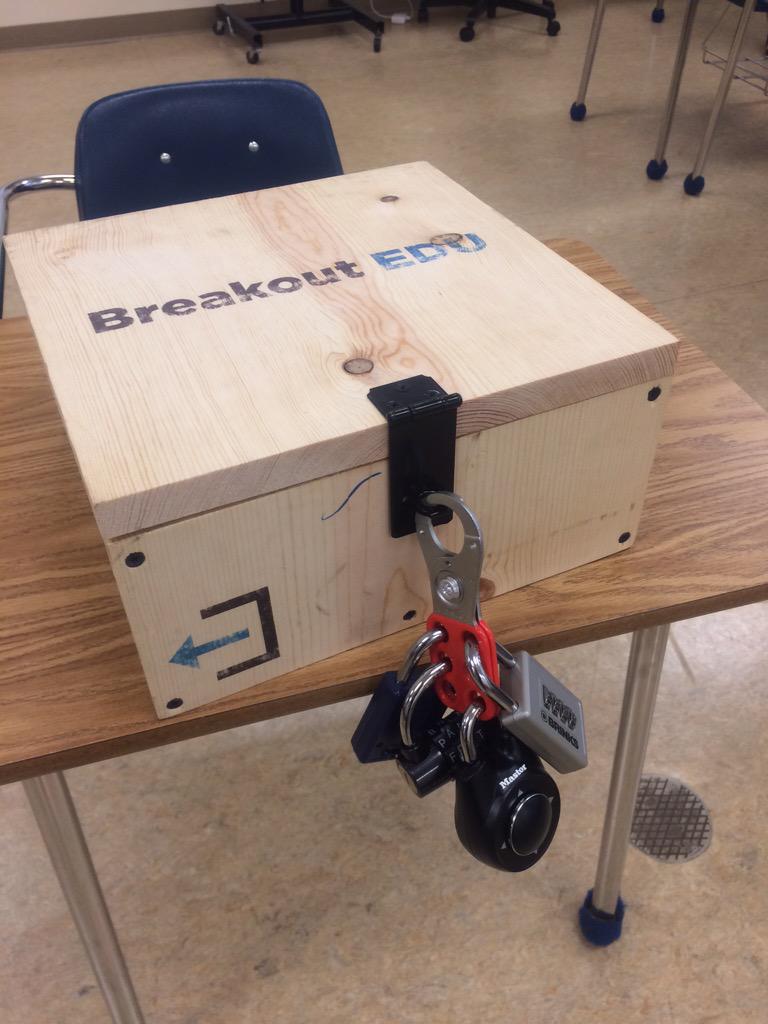
The concept remains the same, however, you don't lock students in a room.  Instead, you use a simple plastic or wooden box locked with a series of different types of locks. What you place inside the box is up to you. How the kids get the box open is the fun part. You as a teacher would leave a series of content-specific clues for them to analyze and as a class they would set to work getting that box open. However, they must understand....they only have a limited time. As these games are timed and if they don't get inside the box, well...they don't get to see what's inside.

Example of the wooden box option
Now, I've participated in one of these activities at a conference and I must say they are a lot of fun and very challenging. I was in a room full of educators and we were all working tirelessly to come up with solutions to the clues and puzzles. We used our expertise, critical thinking skills, communication skills, teamwork, and our phones. This game incorporates all of these things and more as it is a game that is best played with all members of a group working together. We bounced ideas off each other, debated the merits of ideas, deduced from what we already knew, we used our powers as web sleuths to identify information that may help us, and...we had a lot of fun!

We never did see what was inside the box. We ran out of time. But the experience getting there was exciting and all of us reported that we wanted more time to figure it all out (we had 1 more lock to go!!!!). This activity was engaging, fast paced, intellectually stimulating, and required no one sitting on the sidelines. It was an all hands on deck situation.

Since Breakout Edu started, they have been growing a following. You can purchase their products and classroom-ready games through them. Or you can design the box yourself and create a game on your own or visit the site where teachers have shared what they created.

If you want to go a no-cost route and harness the power of those Chromebooks kids have in their hands, you can create a Digital BreakoutEdu experience for your students. Same concept, no box, all digital tools. The link will take you to a series of links that show you how you can design your own digital box using Google Forms and how you can create a game for your students.

These games are great as an inquiry-based activity at the beginning or middle of a unit. It can be used as a formative assessment tool to find out what your students have learned. They could also be used for reviewing concepts covered in class before a test. The game is great for every subject and every concept. All it takes is a bit of work on the back end to develop the clues, set up the "box," and let your students roll with it.

I'll be hosting a Digital BreakoutEdu PD next month at BR & NU to demonstrate how I created the game. That is, of course, after all participants try to Breakout of my game....if you can. 😜