Showing posts with label Learner-Focused. Show all posts

Monday, March 6, 2017

Apps I'm Into: Blended Learning, Guided Reading, & Student Organization

Just a quick rundown of some apps I've been looking at in the past few weeks. I get very Google-centric here because of their vast array of resources and the availability of them, but it's important to remember there are amazing #EdTech resources outside of the Google realm. All three of these resources are designed to be for any curriculum. They are tools every class can use as apart of their repertoire.

TES Teach with Blend Space

This is a favorite of a lot of people in the EdTech world. For Blended Learning purposes (think flipped but not completely), this resource is a big one. You can house a series of steps for your students all in one easy to navigate, and use, hub for a self-contained lesson. Add content (documents, video, images, etc.) from your computer or the web, and provide guidance for students. The resource is shareable and embed-able (as you can see below) and makes complex tasks with numerous steps easy for students to grasp.


A link to the above file if you'd like to see it in a new tab:
https://www.tes.com/lessons/C9C0J3u6cp4OPQ/rise-of-fascism-dbq-prep 


Actively Learn

I'm a huge fan of EdPuzzle for videos (forces students to answer questions about the video before proceeding) and Actively Learn works very similarly but with articles and primary source documents. Have students answer questions as they read as part of their check for understanding. Want them to discuss items while they are reading (What? Thinking...while they are reading?), create the space for them. Want them to take a poll within the document at any place to gauge their opinions or understanding? Well....lets' do that!! It's one of those products that asks you to create a classroom and have students sign into it. But it is well worth it. Ken Buck at NU has been giving it a go as of late and he reports its an excellent resource for Primary Source documents and his students' understanding of them. There are a ton of features and options and Actively Learn walks you through the process in an easy to understand way.

With Actively Learn, you set the pace with students, get them to answer all the questions in a rich manner, and allow for a deeper understanding of course material. After clicking, "Read More" check out the pic and gifs on how this looks for the student.

Tuesday, February 14, 2017

Google Drawing: Students Create Memes

Memes...MeeMees...whatevs you call em, students are using them. Ms. Keri Kemble at NU incorporates some great lessons using micro-writing and having students create memes is a great critical thinking activity for students to whittle down a story or concept into a singular image with limited text.

Google Drawing is a G Suite App than can help with this and the great Alice Keeler a heavy weight in the EdTech world, has a great template and step by step process on how to let students create memes to demonstrate their understanding. You set the topic/subject and push out the template and get them to create.

A great wrap up to this activity is to create a Padlet and have students post their work and comment on other's work. You can host the Padlet (through embedding) on your Schoology course or website.

Great for visual learners and those that are having trouble understanding difficult concepts covered in the class.

Check out Alice Keeler's other templates when you get an opportunity, check out her other great resources, and give her a follow on Twitter for great ideas in real time!

If you need help incorporating this into your curriculum, do not hesitate to get in touch with me!

Voice & Choice Activity: Show Me What You Know!

Student engagement is key in the 21st century classroom. Technology can help engage students but nothing beats sound lesson design and flow that piques and quenches a student's thirst for understanding the world around them.

Students invariably want greater control of their learning experiences. It's a lot more than just "What" they learn. Providing opportunities for students to express their voice and choose the method in which they express it is just one of the ways students get engaged in any classroom.

One easy-to-implement strategy that addresses this need for engagement and allows students to take control of their learning is through the old "menu option" assignment. Although not a new idea, its a powerful one and with technology the opportunities for student creativity goes beyond the traditional paper-and-pen method.

An example of this is the document embedded below from a group of teachers in the UK who literally took the "menu option" idea and used a popular restaurant amongst British teenagers as the basis for their choices.


If you'd like a copy of this doc, grab it here: Cheeky Nandos Copy

Utilizing the menu options giving students 'voice" and "choice" is an easy way to substitute assessment ideas using technology. The students will feel empowered to produce their best work if they feel they had some control over their choice. Especially when they publish their work for you and their peers to see....the focus of this post.

Show Me What You Know!
This idea comes from one of the creators of the Hyperdoc movement, Lisa Highfill. The idea is pretty straight forward - when appropriate in the curriculum, allow students to choose how they showcase their knowledge and understanding of what they have learned in order to demonstrate mastery.

If you would like to see other examples of this idea, visit her site here and while you're there poke around some of the other areas where she provides rich ideas for the classroom.

I've created one below as a Google Slides template for you all to have copies of. You will have to edit it to change elements on the file including: how students turn in their work to you, some of the resources you want to give them a choice to explore, or anything you'd like to add to personalize the assignment. After you edit it, simply copy and paste it into an already existing Slide deck, publish it to the web, or embed it in your Schoology course or on your website.

Get your copy of the above file HERE.

Give this a go and see what you get from students. Encourage them to explain themselves in a rich manner. Push them to produce their best and most creative work. Publish their work to the class, to other classes, to parents, to the world. Don't be scared you might not be an expert in any of these technologies. In fact, its best you aren't. Encourage your kids to be the experts. Learn with them. They may surprise you how much ownership they take on knowing you can help them only so far.

If you need help implementing this (or similar ideas like it) please do not hesitate to get in touch with me.

Tuesday, February 7, 2017

Collaboration and Professional Growth: Create or Build Your #PLN

Collaboration has changed in education as the mechanisms to allow this process to occur have opened up. Sure, you, as an Educator, have always had the ability to walk down the hall to tap the shoulder of a colleague and work on common assessments or co-plan a series of lessons. But with the roll out of some truly fascinating technology and a shifting school model that institutionalizes the practice, this is the golden age of working together to give students a rich and relevant educational experience.

And this greater connection with other professionals isn't limited to those that you see in the staff lounge at lunch or talk with on the way out to the parking lot after a long day. The availability of thousands of excellent, risk-taking, eager, supportive, and collaborative educators is as easy to find as turning on your phone. Not only are there swaths of teachers around the world willing to work with others, but they can also problem solve issues rather quickly.

Case in point. Not long ago I was asked by a colleague to help them access resources and programs specific to their subject matter. Their subject matter is in an area I am sorely limited in so one of the first things I did was "reach out" to a PLN of local TOSAs and Instructional Coaches I am apart of. We communicate with one another through a "walkie-talkie" service called Voxer. I opened up my phone, pulled up the app, and left a voice message for the group of about 20 educators from the Sacramento region describing my problem and asking them for help and guidance. Within the hour, I had a number of responses as many had been in a similar position once or twice in their time. Already I had many avenues to explore and I had barely begun my research on my own. To have answers so readily available and quickly was invaluable. To lean on others' expertise saved me time and energy.

We are all experts in our worlds. But there are limitations in that expertise as there are a number of areas we all can improve on. Maybe you're the Science teacher that can wax poetic on numerous topics, but you're having trouble unlocking a passion in your students for your subject. Maybe you're the History teacher that has been trying new things here and there but have pretty much been doing the same thing for the past 10 years because of the challenges of wholesale changes. The colleague who approached me for help is brilliant but understands their limitations and wants to grow professionally. I have a lot of respect for that.

We don't need to come up with everything on our own. We shouldn't shy away from risk-taking because of the unknown. We shouldn't use our expertise in our subject matter as some excuse not to grow and adapt to a changing learning environment.

As we brave this long winter of ours, the comfortable thing to do is to retreat to warm and cozy climes. Let's do the opposite in our professional lives. Below are some easy ways for you to get connected with other like-minded educators.

💁🏽‍♂️ Great Resource for learning how to set up a PLN

📰 Feedly - Great RSS tool to have all your blogs in one place. A lot of amazing educators you could contact to establish and develop your PLN use blogging as a means to communicate what they do in the classroom and discuss experiences

🎤 Voxer - start a local group with your peers so when you are not able to all get together you can still access their expertise. Supports text, images, gifs, but it's main function is to allow you to leave audio messages to the group for them to access on demand

☕️ Meetup - local groups meet up at a designated time to collaborate on projects and issues important to the group

🗯 Twitter - I've blogged about the virtues of Twitter. I'm a fan and using it to connect with like-minded professionals has been a game-changer. Search hashtags based on your subject matter or check out and participate in a Twitter chat

🙂📘Facebook - as if I needed to provide the link to this site. There a large number of educator groups on Facebook and with hashtag searches they're easily identifiable.

There are other platforms and resources out there that can get you connected to others. And the connection is key this day and age. Whatever your platform it will benefit your craft, it will expose you to new ideas, and it will help you grow as a professional. Ultimately, it will benefit your students. And that's what matters most.

Wednesday, November 23, 2016

The NEW Google Sites: It's About Time!!

Ok...I'm a bit giddy about this one!! I heard back in July that Google was revamping their Google Sites and letting some early adopters take a look at it in beta. That period of time was a quiet one as early adopters were mum on social media about it all...call it Phase 🤐 Well, that phase is past us now and Google released the product to the public and we all have access now!!

To explain my giddiness, recall, some of you who remember, when we all had district hosted websites.  I spent years altering mine to fit my and my students' needs. It was a daily feature in my curriculum somehow, someway. I was proud of my baby.  She (don't know why she's a she, but just go with it) was amazing. But then she went away. We didn't re-up with the hosting company and... bye bye websites. In the aftermath, I searched for replacements. Sorry Weebly, you weren't ready. No thank you Wordpress. Eventually I settled on Blogger (one of the reasons when I started this new gig I went straight there to build a site). Before I decided on Blogger, I spent a considerable time with Google Sites. Before this massive redesign, Google Sites looked the same 4-5 years ago as it did two days ago. It was confusing to build a site, it was limited in what you could do, I didn't like the way it looked or operated for the user (that was key!!), and I didn't have the time or patience to really get into it.


So the past few years, as Google has become synonymous with education applications, I've been waiting for them to turn their attention to Google Sites for the upgrade. They've delivered! Easy to use, collaborative, with all the integration of other Google products (Docs, Forms, Slides, YouTube, Maps, etc.), the New Google Sites is going to be yuuuuuuge (we have to say that now instead of "huge," right?).

For the Teacher:

  • Easily create a site for your class using their drag and drop tools
  • For those not using Schoology yet, you can push out assignments and instructions to students using this tool for classwork or homework
  • Create sites or pages on your site to publish student work and examples
  • For Club advisers, Coaches, and other Extra-Curricular program leaders, you now can promote thos programs to the community and the world
For the Student:
  • Student Portfolios - because it integrates with their Google Drive and they can upload virtually anything from there, they have a tailor-made student portfolio for their work in your class and all classes - this is great for employers and college recruiters to see
  • Collaborative Student Projects - the sharing/collaborative function works the same as other Google products
  • Presentations - because of it's sleek look it can be used to present research findings as a culminating assessment 
  • Make connections in the real world - students can practice some of their Digital Citizenship norms and skills by creating a site for their own personal interests, publishing, marketing/branding, and adapting it


Like I say...I'm giddy. So much so that I'm going to transition my current site into the New Google Slides in the coming months as my primary mode of communicating with all of ya'll. I'll keep the blog (Blogger being another Google product), but you'll most likely find it on my new site in the future. 

To access the new Google Sites dashboard to build your own, click the link here: The NEW Google Sites!! Have fun getting into it!! 

Update: If you need some assistance setting up your Site, check out the EdTechTeam webinar below for a walk through.


And if you like your tips in written (and slightly visual form), check out the online flyer from EdTechTeam.


Monday, October 24, 2016

Upcoming PD Offerings Through November!

You can always check the EdTech Professional Development Calendar on this site by clicking the tab up top. I update it weekly (these days)

Upcoming EdTech Playgrounds!!
Come join us for what some people are calling "the most amazing experience of my adult life..." Ok, I may have paid some to say that, but it's a Playground people!! Time to play!!

Wednesday 10/26 @NU 4pm Library Conference Room - Sign Up Here

Wednesday 11/2​ @ BR 4pm Career Center - Sign Up Here

ELL EdTech Resources
This will be a traditional PD Session where I will present EdTech resources to assist you in differentiating instruction for ELL populations. The resources I cover is also beneficial for other populations outside of just ELLs. There will be time embedded in the session for you to explore some or all of the products discussed. All are welcome to attend whether you have ELLs or not.

Wednesday 11/9 @ NU 4pm Venue TBD - Sign Up Here

Google For Beginners
This will be a traditional PD Session where I will present tips and tricks on a number of G Suite Apps (Docs, Slides, Forms, Drawing). There will be time in the sessions for you to develop products and explore the features covered. All skill levels welcomed.

Monday 11/14 @ NU 4pm Venue TBD - Sign Up Here

Wednesday 11/16 @ BR 4pm Venue TBD - Sign Up Here

Formative Assessments
This will be a traditional PD Session where I will present EDTech answers to assessing your students. Shoot some life into your assessments so you can get an authentic understanding where your students are in their development! There will be time in the session for you to build your own assessment to administer the next day if need be! All skill levels are welcome.

Monday 11/21 @ NU 4pm Venue TBD - Sign Up Here

Wednesday 11/30 @ BR 4pm Venue TBD - Sign Up Here

Wednesday, October 5, 2016

Seesaw: Web Student Portfolio/ for an Entire Class!

Digital Portfolios are the rage these days as educators are trying to harness emerging technologies to try to engage students and have them build a historical record of products demonstrating progress. There are many products that can do this job out there (Google Slides and Docs are one of them). One product I had a lot of fun demoing recently is a luscious looking one called Seesaw (Chrome Store App).

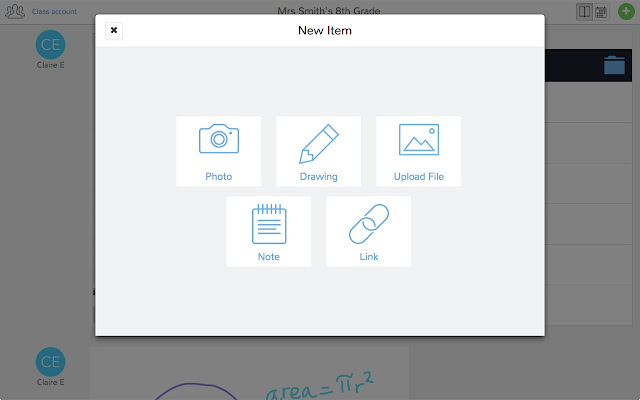
With Seesaw you give students and authentic audience for their work (students, teachers, parents) with immediate feedback that is controlled by you! Students have the ability to post a number of different pieces of media (images, videos, audio, links, documents, drawings) to demonstrate work produced. You as the teacher control the flow of products so students can't just post something without some moderation.

The tools at your students' disposal to create a working portfolio. 
There's a social component to this as well. The interface works a lot like Instagram with the ability for students to "Like" and "Comment" on other students' work - again with your approval. Parents are also plugged into your class and can see the class feed and have the ability to like and comment on student work. So parents get a real time look at what their student is doing in your class.


And students get a chance to choose what goes into their portfolio to represent their best work to show student progress. Check out the video below of a (very precocious and future President of the United States) 10 year old student talk about how Seesaw works.


This tool isn't just for elementary students (although much more Primary schools utilize it more than Secondary schools do)...this is a powerful Freemium service that has the ability to really engage High School students and give parents a look at what their student is doing in your class.

If anyone wants to give it a try, I can help with the setup and implementation. There are a slew of tools you can use to identify your student's progress that I haven't got into on this post. And if there are any teachers using Seesaw already, I wanna hear about it! Below are some links that may be helpful to those that are interested in checking it out!

Seesaw Teacher Overview
5 Great Features of Seesaw