You can always check the EdTech Professional Development Calendar on this site by clicking the tab up top. I update it weekly (these days)
Upcoming EdTech Playgrounds!! Come join us for what some people are calling "the most amazing experience of my adult life..." Ok, I may have paid some to say that, but it's a Playground people!! Time to play!!
Wednesday 10/26 @NU 4pm Library Conference Room - Sign Up Here
Wednesday 11/2 @ BR 4pm Career Center - Sign Up Here
ELL EdTech Resources This will be a traditional PD Session where I will present EdTech resources to assist you in differentiating instruction for ELL populations. The resources I cover is also beneficial for other populations outside of just ELLs. There will be time embedded in the session for you to explore some or all of the products discussed. All are welcome to attend whether you have ELLs or not.
Google For Beginners This will be a traditional PD Session where I will present tips and tricks on a number of G Suite Apps (Docs, Slides, Forms, Drawing). There will be time in the sessions for you to develop products and explore the features covered. All skill levels welcomed.
Formative Assessments This will be a traditional PD Session where I will present EDTech answers to assessing your students. Shoot some life into your assessments so you can get an authentic understanding where your students are in their development! There will be time in the session for you to build your own assessment to administer the next day if need be! All skill levels are welcome.
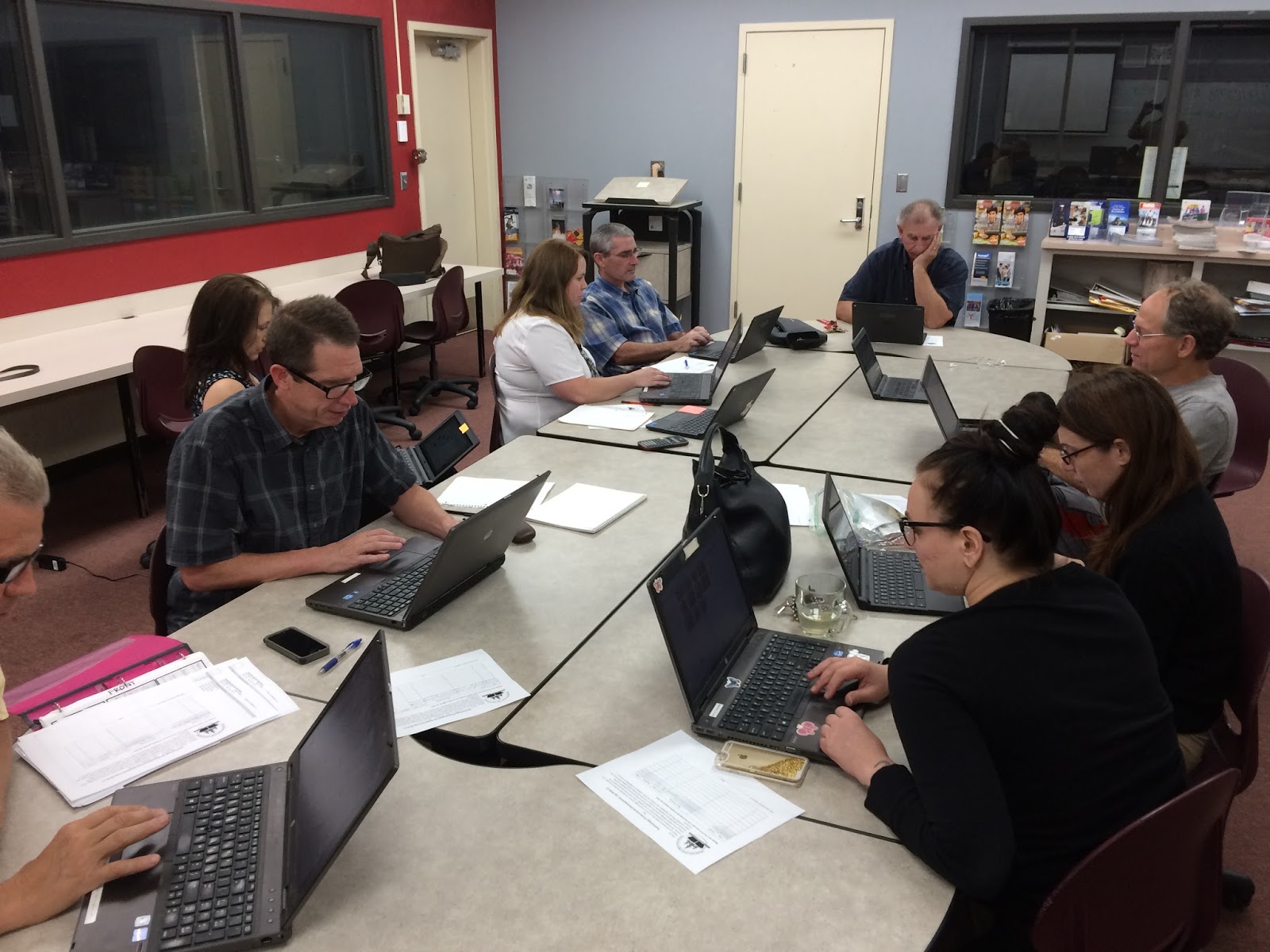
Another successful EdTech Playground took place at BR yesterday as a small group of professionals got around a table and worked diligently on building their EdTech skill set! There were inspirational travel quotes recited by Jeff Carrow, the BR Math Department were working together on Desmos, and the great Duane Zauner even walked out of there with some new arrows in the Tech quiver.
Check out the pics below and also their feedback on the embedded Padlet - a great EdTech tool I've used for Formative Assessments, project turn-ins, back-channel chats, and soooo many other uses.
~Don't forget to sign up for the next EdTech Playground!~
~All sites, all abilities/skill levels are welcome and encouraged to attend!!~
Wednesday Oct 26th @ NU - EdTechPlayground - all are welcome - Sign up Here
Wednesday Nov 2nd @ BR - EdTechPlayground - all are welcome - Sign Up Here
The first gathering of educators at NU for the EdTech Playground is complete and .... it was successful!! A small (but a motivated and tenacious!) group got together from various sites and curriculum areas and got to work! We worked individually, we collaborated, we talked about life outside of school...we solved world problems!! And...there were cupcakes!! *cupcakes are not guaranteed at future EdTech Playground PDs
In all seriousness, it was an excellent 90 minutes of professionals doing what professionals do: working to solve problems, pushing their skill set to another level, and opening up lines of communication with peers to deal with common problems. Each individual worked diligently on whatever interested them in order to integrate more technology in their curriculum.
I could go on and on...but I'll let your colleagues say it all for me...
"Very helpful to be able to navigate Google Drive so I can teach my students"
"Working with other people was nice! Ready to take things to the next level"
"Learned how to make a test in Schoology and I'm ecstatic! This session was very helpful for me."
"This session was exactly what I needed for technology and Professional Development....it gave me a chance to work on things I haven't had the time to work on."
"I was able to open up my Chromebook for the first time...and set up classes in Pearson"
"I appreciated the time!"
"This session was tremendously helpful!! I worked on figuring out why my Schoology grades weren't syncing with eSchools."
Don't miss the next one Monday 10/10 @BR - Sign Up Here
When I was in the classroom teaching Psychology, it wouldn't be uncommon weeks into the year to receive a new student in my class. These wouldn't be transfers from other classes. Those would typically take place around the first few days of school. These would be new students to the school. Foreign exchange students from Germany, Japan, Spain, China, Holland, France or anywhere else some lucky soul came from when they made the decision to get educated for a year in California. Often times these students had a basic skill set in the English language but it was always a challenge. Especially since understanding Psychology is very difficult. We don't have as many ELLs in our area as other geographic locations in California, however we have a fair share. And their needs are very specific and need to be met if we are fulfilling our obligation of educating and preparing all students. But...its a challenge. One I found I struggled with often in my time in the classroom.
Below is a short clip to a 12-minute, short film called Immersion, from the WIDA Consortium that fictionalizes the struggles ELL learners face in the classroom. It captures very vividly the obstacles ELL students face in the classroom. But one thing that stuck out to me was the child in the clip had desire, drive, and thirst for participation in the lesson and success on a test to be taken in the future.
Although fictionalized, it's a good visual representation of how challenging the classroom can be for ELL students. It also demonstrates the need to differentiate instruction for our ELL populations.
Here is where EdTech can help....Below are some Web-based applications you can utilize in your curriculum to bridge this divide with our students. Now there are a ton of other products out there, and a lot of them can help with struggling learners...not just ELLs. Take a look and see what works for you! And if you use something that may be helpful to others, let me know and I'll spread the love!
What You Already Have: Google Translate: Students can translate text ans whole web pages in their native language. Android and iOS apps too that allow you to use your camera to translate words in physical space (i.e. Stop sign), speak your native language to get the audio translation, and translate any app the student has; you could also ask the student to type up an assignment in their native language and use Google Translate to understand their ideas
YouTube: With their webcam, students can record (in Live Streaming Mode) their ideas, thoughts, processes, and practice their English language skills without the self-consciousness that comes with speaking in front of the classroom
Speech to Text in Docs: Great way to have students practice their English speaking skills without having to spend too long searching the proper way to spell
Extensions: Read&Write for Google Docs & the Web- Great for ELL, students with dyslexia, and other learning needs; students can have words read aloud, see the meaning of them with text and images, get summaries of text on the website itself, annotation tools....this extension is a must-have SpeakIt! - Simply highlight text on any site or document and the word will be spoken through the speakers
Web-Apps Fotojet - Free online collages to allow students to express their ideas in visual form Canva - Create beautiful web design graphics in many different formats Clicker Docs - supports and develops writing skills for struggling students building their writing literacy Newsela - Change the reading levels of current events and non-fiction text to meet your students' needs while building their reading comprehension. Real-time assessments are built into the articles as well. BrainPop - Animated, synthesized content to help struggling learners comprehend complex material
Ok...this one's a good one. Technology brings up some issues as we transition from the traditional classroom to a 1:1 environment. But it also provides opportunities as well. Google (especially) has been at the forefront of both solving issues and creating opportunities.
Issue: How can we maintain a student-centered learning environment where students feel empowered to create, to solve complex problems, and work together to do so?
Solution: Have access to their screens through Google Cast - this will allow the students to display their work to the entire class via your projector, ask for student input on solving common problems and mistakes, allow students to be the experts in the room and explain how they arrived at a solution, or created a wonderful product, or to demonstrate their own mastery.
How it works....well, you download an app from the Chrome Store, your students download an extension from the same store. A few things to type and a few buttons to press and away you all go. The product syncs all your Google Classroom classes so those using Classroom will find the adding students part very easy.
For all you visual learners, have a gander at this ace bloke from the UK demoing the basic functionality of it:
This tool is extremely powerful, and my mind drifts to other solutions it can provide as well. For instance, can it grant access to multiple screens so you can watch everyone's screen during an activity or, better yet, an assessment? Hmmmmmm <enter thinking emoji here>
Anywho, check it out and if there are any teachers already using it or want to try it out in their classrooms, I'd love to check it out and work with you to see how it plays with the students!
Thanks for reading!! ~~~ Follow Up 9/15/16: The "Google Cast" Extension is blocked for students. Currently looking into solutions for that through the Tech Department.
Follow Up to the Follow Up 9/22/16: Was told that there were issues last year in using this product in class. Looks like for the time being, students can not download the extension....I'm gonna keep shaking the tree
I recently found an old college textbook of mine as I was clearing out my classroom. And I found out that I used to love sticky notes. I would have handwritten notes painstakingly detailing the information I was consuming in a clean(-ish) fashion in the event that I wanted to sell the book back for cash in order to buy...more books.
Not actual aforementioned textbook, but you get the idea, ya know?
This method of breaking down text into words I could understand helped me learn difficult material and is a time-honored and research-backed method of learning. It is also an essential skill in need of developing in a Common Core, 21st Century learning environment.
Close Reading, research projects, tried and true reading strategies, "talking to the text"... these all require the ability to write in the margins of documents. But how to do it in a 1:1 environment? Oh let me count the ways...or at least two of them.
Two services (both free!!) are Note Anywhere and Stickies. Here's the gist of both: you can activate it on any site and any sticky note you leave on the site stays there until you remove it. Because its a Chrome Extension, it is housed in your browser and with the click of a button, a sticky note appears on the site.
So I've used Note Anywhere in the past with my students. I've used it to jot notes for myself on student work that was turned in virtually and I've taught students how to use it effectively when I have them read internet content. Check out my little screenshot vid of me using the service here (don't judge...I never screencast...gotta work on that).
There are other sticky note products HereHereHere and Here ... its really just which one works best for you and your students.
Looking for different ways for your students to communicate their understanding of concepts covered in class? Want them to get creative with their writing and storytelling? Have some aspiring writers that could use a push in publishing their work? Storybird is a web program that can engage learners in numerous ways and give your students the opportunity to publish their work within the Storybird community.
Often times when asking students that they will write (a story, essay, poetry...whatever it may be), the teenage eye roll isn't too far away. With Storybird, students will enjoy the creation process and develop their literacy abilities while doing so.
For Students: The ability to create and build high-quality and original stories (with images) to demonstrate their knowledge, understanding, literacy skills, creativity, and (for the up and coming writer) develop their publishing and marketing abilities. It also has a collaborator feature which allows students to work with peers or even established writers and artists.
For Teachers: You can develop a classroom and assign projects within Storybird. Track their progress as they create and assess their understanding of concepts delivered in class.
I can think of many uses in ELA and the Social Sciences but it could be utilized in many different subject matters. Give it a shot! Below is Storybird's website and Chrome Web Store link if you're interested.
Google has an arsenal (Gooners!) of apps and web programs that you can utilize in various ways throughout your day. One of these is Google Hangouts - their Personal Messaging (PM) service.
This service is free, nimble, and accessible to all students and teachers in the district. With text, phone, and video conferencing features, this is a great service to use in a variety ways - in and out of the classroom. And all conversations/activity can be archived to save for a later date to demonstrate performance
Ideas to use for class:
Video chat with an expert in a field of study you are covering in your curriculum where your students can "ask the expert"
Group Live Broadcasts as an assessment for group projects
Live chatting during a live event (Debates start this month!!)
Develop Online Portfolios through past video and text chats
Check out this link for more subject-specific ideas
Ideas for you:
Remote Professional Development/PLC/Collaboration
Video conference with educational and academic professionals during collaboration time/Department Meetings
Quick communication with colleagues throughout the workday or in off-hours
There are a wealth of opportunities using this tool and you all have access to it as well as to everyone in the District! Have fun!!
For those that have been using ChromeBooks for some time now, you know the sheer volume of tabs that open in your Chrome browser. Seemingly everything you click seems to open a new tab whether you want it to or not. More times than not, you'll look at your browser and be marveled at just how many tabs open up as you navigate through a myriad of web-based programs, sites, and just randomness...
Well...all those tabs (although essential to you doing your work) can slow down your performance speed significantly. In the world of Google, where there are problems, there are usually solutions...I give you One Tab!
Chrome allows you to "add-on" to it's browser to customize your experiences. These add-ons are called Extensions (I'm going to be posting about Extensions soon hopefully) and can be downloaded in the Chrome Web Store. Here you have a plethora of different ways you can maximize your (and your students') productivity! One Tab is one of these powerful tools.
One Tab takes all of your open tabs and houses them in one tab with the click of a button, freeing up the memory chewing tabs that stay open on your browser. They, essentially, go to sleep until you want to wake them up. You can activate them or delete them right from the "One Tab" tab. This service is a great one for you and your students to utilize today!!
View from my One Tab I have "open" whilst typing this post
Give One Tab (and soooo many more Extensions) a try to maximize your efficiency while working.