
.

Showing posts with label Blended Learning. Show all posts
Showing posts with label Blended Learning. Show all posts
Thursday, May 25, 2017
Schoology Training: Monday August 7th-Friday August 12th

Friday, March 31, 2017
The Pedagogy of Blended Learning: Change is a Comin'
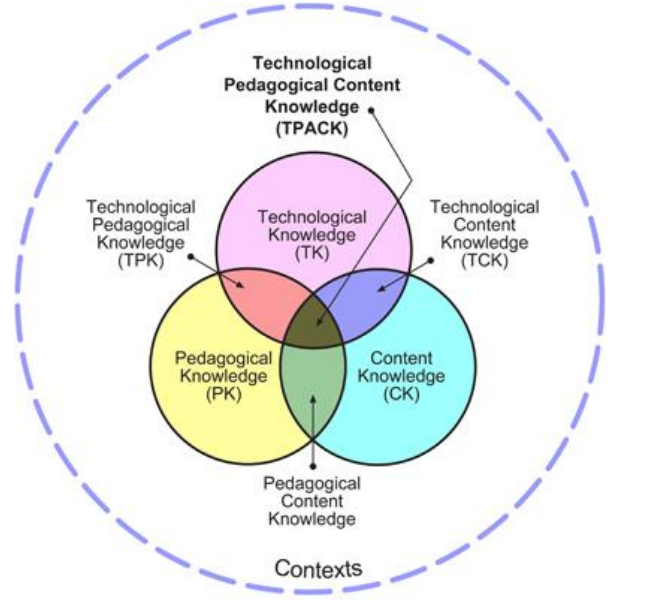
You are the expert in your subject matter. Times are changing. Learners are changing. If you're teaching something kids can google, your time and their time is wasted.
We need to be building their skills sets. Preparing them for a world where basic info is in their pockets. What to do with that info however is critical. How to use that info to derive an understanding of the world around them is essential.
The sit-and-take method is a dying model. As is the one-size-fits all method of teaching. Think about one of your classes. You have groups of students that have varying needs. I'm not just talking about those with 504s and IEPs. Reading comprehension issues, learning disabilities, apathy, advanced learners, students with social-emotional needs to name just a few. The list is long and lengthy. The challenges immense. With each set of group needs, there are different strategies that need to be employed. Lesson design needs to accommodate and provide students with the tools to be successful. The learning environment (physical and intellectual) you create needs to be one where all students can learn, develop their skill set, achieve, and be successful.
Tuesday, March 14, 2017
District Shift in Blended Learning: The Case for Full Schoology Implementation from a Skeptic

The purpose of this post is to persuade, not to teach. I believe all teachers should have a Schoology presence in their classroom curriculum starting next year. This may be scary for some. Those that know me well, know I was a Schoology resister. I believe it would benefit our student population, our interactions with parents, and help get students "College and Career Ready." Future posts on Schoology will be more geared towards teaching.
Student Engagement
Our students need to be engaged in their learning. This takes on many forms in the context of a given year, unit, or even lesson. There isn't one way to truly engage all learners. The only way we can drive towards near full engagement is through innovative and inspired lesson design. It's you as an expert in your subject and craft developing lessons that challenge and push your students' understanding of the material. Shifting towards a Schoology delivery system will not instantly make your lessons more engaging but it will get you creating and sharing new ideas on how to innovate your curriculum. Once comfortable in a Blended Learning environment, the educator, ever the big picture thinker, starts to see possibilities of innovation. They start to ask "what can I do with this?" That is when students become engaged. When we as educators continually keep things fresh. When we inspire our students to be innovative thinkers through our own.
Interactions with Parents
Study after study shows a growing need for parents to be connected to the classroom to encourage student success. Schoology automates this process as they have access to student performance, they're able to see what goes on a daily basis, and individual or group communication becomes a snap. Because parents "sign in" as a parent to your class their information is there and at the ready for you to easily connect with them. A number of parents have told me they like how easy it is for them to know what is happening in the classroom and that it cuts down on the "How's my kid doing?" emails and phone calls. We have a problem with "system overload" for parents. Teachers have various avenues of reporting information to parents (websites, eSchools, Schoology, other apps and services, etc ). All are excellent means of communication but for a parent, sometimes even for the tech savviest of them all, this proves both a challenge and a frustration to get a clear picture of how their student is doing. Through uniformity of processes, we can solve this problem if we commit to using Schoology as our chief source of communication with parents through curriculum delivery, parent communication, and timely grade updates.
College and Career Ready
College and Career readiness is not just about content preparation and academic skill development. We've been told for years that we are preparing students for jobs that don't exist yet. I'd say we're doing quite well considering that's like trying to unlock a door in a room full of doors in darkness. However, that's not an apt metaphor. We do know that the world economy is trending towards greater automation and using systems (no matter the career) to manipulate or use data to solve problems. In order to prepare our students we must model this through the delivery of curriculum via a system that allows them to organize and track data, to manage their workflow, and to learn how to solve problems efficiently and collaboratively. This was one of the reasons for the 1:1 initiative - for students to become familiar and proficient in a 21st century environment. I'm not sure the worksheet system is one that prepares our students for future careers. Using an LMS in the classroom will get them familiar with systems they will find themselves learning in as they extend their formal education and when they enter into their chosen careers. The LMS you have at your disposal is Schoology. And it's a pretty good one.
Is Schoology perfect? No way. Teachers have legitimate problems with the system with respect to its integration with 3rd party services (namely eSchools and TurnItIn). Some teachers haven't had enough experience in the environment to understand how it can benefit them and their students - I was certainly that teacher when we purchased the product years ago. I also know that a number of teachers need a lot of tech training in general to feel comfortable to take the leap. I sympathize with those concerns. I also believe that those fears and concerns could dissipate through time with a full commitment to make it work better for teachers, better for students, and better for parents. Take time looking into Schoology this summer (only a few months away) if not sooner and think about what is possible. I'm here to assist those that want to make that shift. I'm hoping everyone will if you haven't already.
Monday, March 6, 2017
Apps I'm Into: Blended Learning, Guided Reading, & Student Organization

TES Teach with Blend Space
This is a favorite of a lot of people in the EdTech world. For Blended Learning purposes (think flipped but not completely), this resource is a big one. You can house a series of steps for your students all in one easy to navigate, and use, hub for a self-contained lesson. Add content (documents, video, images, etc.) from your computer or the web, and provide guidance for students. The resource is shareable and embed-able (as you can see below) and makes complex tasks with numerous steps easy for students to grasp.A link to the above file if you'd like to see it in a new tab:
https://www.tes.com/lessons/C9C0J3u6cp4OPQ/rise-of-fascism-dbq-prep
Actively Learn
I'm a huge fan of EdPuzzle for videos (forces students to answer questions about the video before proceeding) and Actively Learn works very similarly but with articles and primary source documents. Have students answer questions as they read as part of their check for understanding. Want them to discuss items while they are reading (What? Thinking...while they are reading?), create the space for them. Want them to take a poll within the document at any place to gauge their opinions or understanding? Well....lets' do that!! It's one of those products that asks you to create a classroom and have students sign into it. But it is well worth it. Ken Buck at NU has been giving it a go as of late and he reports its an excellent resource for Primary Source documents and his students' understanding of them. There are a ton of features and options and Actively Learn walks you through the process in an easy to understand way.With Actively Learn, you set the pace with students, get them to answer all the questions in a rich manner, and allow for a deeper understanding of course material. After clicking, "Read More" check out the pic and gifs on how this looks for the student.
Tuesday, February 14, 2017
Voice & Choice Activity: Show Me What You Know!
 Student engagement is key in the 21st century classroom. Technology can help engage students but nothing beats sound lesson design and flow that piques and quenches a student's thirst for understanding the world around them.
Students invariably want greater control of their learning experiences. It's a lot more than just "What" they learn. Providing opportunities for students to express their voice and choose the method in which they express it is just one of the ways students get engaged in any classroom.
One easy-to-implement strategy that addresses this need for engagement and allows students to take control of their learning is through the old "menu option" assignment. Although not a new idea, its a powerful one and with technology the opportunities for student creativity goes beyond the traditional paper-and-pen method.
An example of this is the document embedded below from a group of teachers in the UK who literally took the "menu option" idea and used a popular restaurant amongst British teenagers as the basis for their choices.
If you'd like a copy of this doc, grab it here: Cheeky Nandos Copy
Utilizing the menu options giving students 'voice" and "choice" is an easy way to substitute assessment ideas using technology. The students will feel empowered to produce their best work if they feel they had some control over their choice. Especially when they publish their work for you and their peers to see....the focus of this post.
Show Me What You Know!
This idea comes from one of the creators of the Hyperdoc movement, Lisa Highfill. The idea is pretty straight forward - when appropriate in the curriculum, allow students to choose how they showcase their knowledge and understanding of what they have learned in order to demonstrate mastery.
If you would like to see other examples of this idea, visit her site here and while you're there poke around some of the other areas where she provides rich ideas for the classroom.
I've created one below as a Google Slides template for you all to have copies of. You will have to edit it to change elements on the file including: how students turn in their work to you, some of the resources you want to give them a choice to explore, or anything you'd like to add to personalize the assignment. After you edit it, simply copy and paste it into an already existing Slide deck, publish it to the web, or embed it in your Schoology course or on your website.
Get your copy of the above file HERE.
Give this a go and see what you get from students. Encourage them to explain themselves in a rich manner. Push them to produce their best and most creative work. Publish their work to the class, to other classes, to parents, to the world. Don't be scared you might not be an expert in any of these technologies. In fact, its best you aren't. Encourage your kids to be the experts. Learn with them. They may surprise you how much ownership they take on knowing you can help them only so far.
If you need help implementing this (or similar ideas like it) please do not hesitate to get in touch with me.
Monday, October 24, 2016
Hyperdocs: Harnassing Google Docs To Deepen Learning

I always erred on the side of the "Goldilocks" version - not too much, but not too little guidance and information. I think I did them a disservice, however, in not modeling the proper methods and skills needed to extract the information I wanted them to grasp. I often sacrificed the important critical thinking skill-building structure for the exploration itself. With all the options of products, services, and places students can go to retrieve information regarding a particular topic, it's important for students to discern proper sourcing of information and a deep understanding of how it connects with the overarching concept and learning goals.
Luckily, innovations in educational technology has provided one method of meeting those demands. Enter Hyperdocs! Hyperdocs is a relatively new method of lesson delivery that hits a number of hot button areas: engagement, inquiry-based, differentiated to the learner, and a reflective process of learning that empowers students to extend their learning.

Sounds wicked, yeah? It does take time to create but this may be a good collaborative task for departments to work on during collaboration.
The best way to describe the Hyperdoc itself, is this: It is a self-contained set of activities and resources linked to one document. The Google Doc you start with is like a map to other areas of the web and sources (carefully selected by you) in order to achieve content and skill-based learning goals you've set. Imagine the power of teaching a concept and setting a virtual path for students to follow. Complete with building on whatever skills you are working with them on.

The trick is to provide avenues of exploration, relevant sources, and multiple methods of content delivery to achieve learning goals. There are 1000s of Hyperdocs on the web and no two are alike. They all, however, guide the learner further down the rabbit hole of exploration while stopping along the way for students to interact with one another, refine their ideas and findings, and be cognizant of the learning process.
Here are some sites that allow you to see how other teachers are using these in the classroom:
The Hyperdoc Girls - from the creators themselves! They also provide Templates
Hyperdoc Examples - a lot of examples on this site but it takes an age to load!
Karly Moura's Shared Drive Folder filled with examples
The embedded Doc below is an example of a Hyperdoc on the Weaknesses of the Articles of Confederation to give you an example of what one looks like. If anyone is interested in developing these, I would be more than happy to help out!
Here's a link to the doc if it's hard to see it below
Subscribe to:
Posts (Atom)