Showing posts with label Digital Citizenship. Show all posts

Thursday, January 5, 2017

Twitter: Not Crazy Twitter...Only The Good Stuff

I've been on Twitter since 2009. It was my first way to communicate with students outside of the classroom. For those that use Remind this was my Remind before Remind came along. I didn't really know what to do at first.  I really didn't know how to use it.  Back then, there weren't a ton of students using Twitter - it was all about Facebook...until we all killed that for them.  I used this tool sparingly at first and then as I became more comfortable (and more students began to follow me), I started using it much more.

I went beyond using it as a mere communication tool when I realized the power of it and the game changer that was the use of hashtags. I would have my Government students live tweet their reactions from a Presidential Debate. I had my History students try to raise awareness of a social issue that was important to them. I would get my students to do some wild things and they ate it up (not all of them of course...but, ya know).

Twitter helped me realize the power of "flipping the classroom" and publishing to a "global audience" ... long before I realized I was doing any of that in my classroom. Further down the rabbit hole I went as I sought out new technologies to help me engage students and be efficient the delivery of my curriculum.

I stopped using Twitter as my "student communication" tool when I discovered Remind, but Twitter then became something else for me. It became a Professional Learning Network. Again, before I could put a name to it. I was learning from other educators on what they were doing in the classroom, how they incorporated new technologies, how they curated History and Psychology resources in the classroom, how they were harnessing and leveraging the power of EdTech to expose students to new heights. I was impressed and awed and humbled to see what others around the world were doing with new technologies. And I got thirsty.

It was around 2013 I started to notice how social media was changing and growing rapidly. I still had my old students following me on Twitter (long gone into the sunset en route to their new post-Bear River lives) but now I was gaining new ones. Fast. Even though I wasn't using it in the classroom. Even students I didn't have in my physical classroom. Students at the school I'd never met.

Instagram got big, Facebook wasn't cool anymore, Ask FM became a place kids could cyber bully each other, Vine happened, and then other social media apps and sites were popping in and out of the awareness of students. All the while, Twitter was growing along with these changes....faster than others in some cases. More and more students were using Twitter and I found my role on it change once again to "father-ish figure" - posting random things that I was interested in while also chiming in on conversations my students were involved in where they may need some advice on or guidance with.

It was about student connection. Letting them know that in that vast world of online content and virtual connections with others, they still had someone physical in their lives that they could trust and lean on when things are rough. The latest example of this was just before break when, sadly, Bear River lost two amazing young men in a car accident. I really felt the disconnect with my former students since I left the classroom back in August. I'm there, but not "there." A couple tweets and replies later on Twitter and I like to think I may have helped them (even for a minute) deal with the emotional toll they were experiencing. If I did, the few seconds I took out of my day was more than worth it.

So this post...this post is about advocating for trying something new. If you're not on Twitter yet, go sign up. Make your account. Go find some other educators like you around the country that you can learn from (a simple search of "biology high school teacher educator" will get you loads of search results). Tell your students you're on there and see if they are brave enough to follow you.

If you are on Twitter already, push yourself to try something new. Join a Twitter Chat, start posting really cool things you're doing in the classroom, encourage your students to publish their work for more eyes than just yourselves and for a greater purpose than just a grade, or start a class hashtag and have all your students use it to publish their work on a given assignment or topic.

The uses of Twitter will benefit you and your students in the long run. It will help bridge the technology divide between educators and students. Incorporating publishing on social media in the classroom is engaging to large swaths of students, garnering more student buy-in to your activity, curriculum, and classroom. You can connect with other peers and educators around the globe to learn new things, processes, strategies, and open opportunities for yourself as a professional and your curriculum as a whole. I'm not saying Twitter will make you a better teacher, or it will fundamentally shift your relationship with your students. But you may find travelling down that rabbit's hole can be rewarding for your craft and your students. Go ahead...give it a shot.


Wednesday, November 23, 2016

The NEW Google Sites: It's About Time!!

Ok...I'm a bit giddy about this one!! I heard back in July that Google was revamping their Google Sites and letting some early adopters take a look at it in beta. That period of time was a quiet one as early adopters were mum on social media about it all...call it Phase 🤐 Well, that phase is past us now and Google released the product to the public and we all have access now!!

To explain my giddiness, recall, some of you who remember, when we all had district hosted websites.  I spent years altering mine to fit my and my students' needs. It was a daily feature in my curriculum somehow, someway. I was proud of my baby.  She (don't know why she's a she, but just go with it) was amazing. But then she went away. We didn't re-up with the hosting company and... bye bye websites. In the aftermath, I searched for replacements. Sorry Weebly, you weren't ready. No thank you Wordpress. Eventually I settled on Blogger (one of the reasons when I started this new gig I went straight there to build a site). Before I decided on Blogger, I spent a considerable time with Google Sites. Before this massive redesign, Google Sites looked the same 4-5 years ago as it did two days ago. It was confusing to build a site, it was limited in what you could do, I didn't like the way it looked or operated for the user (that was key!!), and I didn't have the time or patience to really get into it.


So the past few years, as Google has become synonymous with education applications, I've been waiting for them to turn their attention to Google Sites for the upgrade. They've delivered! Easy to use, collaborative, with all the integration of other Google products (Docs, Forms, Slides, YouTube, Maps, etc.), the New Google Sites is going to be yuuuuuuge (we have to say that now instead of "huge," right?).

For the Teacher:

  • Easily create a site for your class using their drag and drop tools
  • For those not using Schoology yet, you can push out assignments and instructions to students using this tool for classwork or homework
  • Create sites or pages on your site to publish student work and examples
  • For Club advisers, Coaches, and other Extra-Curricular program leaders, you now can promote thos programs to the community and the world
For the Student:
  • Student Portfolios - because it integrates with their Google Drive and they can upload virtually anything from there, they have a tailor-made student portfolio for their work in your class and all classes - this is great for employers and college recruiters to see
  • Collaborative Student Projects - the sharing/collaborative function works the same as other Google products
  • Presentations - because of it's sleek look it can be used to present research findings as a culminating assessment 
  • Make connections in the real world - students can practice some of their Digital Citizenship norms and skills by creating a site for their own personal interests, publishing, marketing/branding, and adapting it


Like I say...I'm giddy. So much so that I'm going to transition my current site into the New Google Slides in the coming months as my primary mode of communicating with all of ya'll. I'll keep the blog (Blogger being another Google product), but you'll most likely find it on my new site in the future. 

To access the new Google Sites dashboard to build your own, click the link here: The NEW Google Sites!! Have fun getting into it!! 

Update: If you need some assistance setting up your Site, check out the EdTechTeam webinar below for a walk through.


And if you like your tips in written (and slightly visual form), check out the online flyer from EdTechTeam.


Wednesday, October 5, 2016

Seesaw: Web Student Portfolio/ for an Entire Class!

Digital Portfolios are the rage these days as educators are trying to harness emerging technologies to try to engage students and have them build a historical record of products demonstrating progress. There are many products that can do this job out there (Google Slides and Docs are one of them). One product I had a lot of fun demoing recently is a luscious looking one called Seesaw (Chrome Store App).

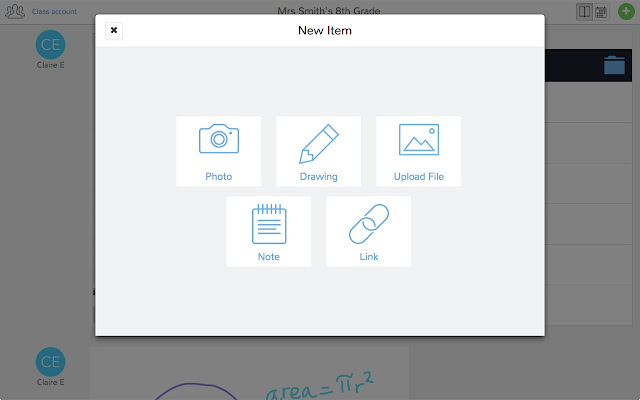
With Seesaw you give students and authentic audience for their work (students, teachers, parents) with immediate feedback that is controlled by you! Students have the ability to post a number of different pieces of media (images, videos, audio, links, documents, drawings) to demonstrate work produced. You as the teacher control the flow of products so students can't just post something without some moderation.

The tools at your students' disposal to create a working portfolio. 
There's a social component to this as well. The interface works a lot like Instagram with the ability for students to "Like" and "Comment" on other students' work - again with your approval. Parents are also plugged into your class and can see the class feed and have the ability to like and comment on student work. So parents get a real time look at what their student is doing in your class.


And students get a chance to choose what goes into their portfolio to represent their best work to show student progress. Check out the video below of a (very precocious and future President of the United States) 10 year old student talk about how Seesaw works.


This tool isn't just for elementary students (although much more Primary schools utilize it more than Secondary schools do)...this is a powerful Freemium service that has the ability to really engage High School students and give parents a look at what their student is doing in your class.

If anyone wants to give it a try, I can help with the setup and implementation. There are a slew of tools you can use to identify your student's progress that I haven't got into on this post. And if there are any teachers using Seesaw already, I wanna hear about it! Below are some links that may be helpful to those that are interested in checking it out!

Seesaw Teacher Overview
5 Great Features of Seesaw


Thursday, September 22, 2016

Digital Citizenship PD: Presented By Jason Bohrer

#whatsinthebeard?
Ever wonder what is hiding in that beard? I don't spend a lot of time thinking about it but every once in a while....

Anywho, the man smiling to the left is a Bear River CTE (Computer Science) & English Teacher as well as a NCSOS Instructional Coach with a wealth of experience in the world of EdTech. He is offering a 4 session workshop on Digital Citizenship, something he is extremely passionate about, and something we all should be teaching in our classes. The sessions are all free to Nevada County educators and it would be a great opportunity for you to see what you can do with your students (and children!!! - I have two small boys of my own who can benefit from this info). Check the flyer below and follow the instructions to sign up!

Go for the excellent (FREE!!!) opportunity to develop your understanding of Digital Citizenship and how to teach it.....stay to ask him "What are you hiding in that beard?" #whatsinthebeard??


Link to the above file